8 Things Worth Paying for as a UGC Creator
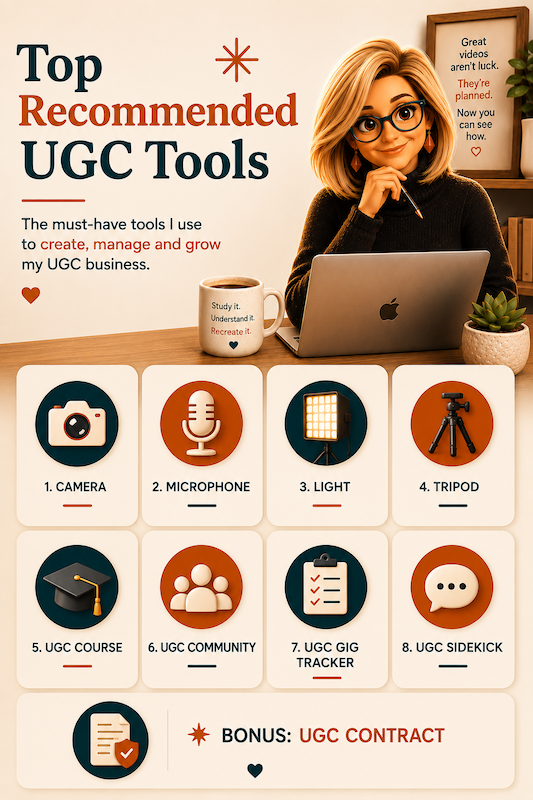
You do not need an expensive studio full of equipment to become a UGC creator. You can start with what you already have and upgrade as your skills and income grow.
But after creating content and working with brands, I have found a few things that are genuinely worth paying for.
Some will improve the quality of your videos. Others will help you protect your business, stay organized, and avoid learning every lesson the hard way.
Here are eight things I believe are worth the investment, plus one important bonus.
Watch the breakdown on TikTok:
Watch on TikTok
1. A Good Camera or Camera Phone
You do not need the newest or most expensive phone on the market.
Brands do not care whether you film with an iPhone, Samsung, or another type of camera. They care about how the finished video looks.
Your content should be clear, well-lit, and easy to watch. If the phone you already own produces good-quality video, start there.
Before spending money on a new phone, learn how to use your current camera settings, clean the lens before filming, and pay attention to your framing and lighting. Those small improvements can make a noticeable difference.
Looking for recommended filming gear? Check my favorite options on my UGC Resources Page.
2. A Reliable Microphone
Good audio can sometimes make a bigger difference than an expensive camera.
When you are first getting started, an affordable lavalier microphone may be all you need. It might not have every feature, but it can help your voice sound clearer than it would using your phone’s built-in microphone.
I have gone through several sets of microphones. Each time, I upgraded a little.
I currently use the Hollyland Lark system because it includes a receiver and two microphones. That means my husband and I can both be on mic when we create content together. It also helps reduce distracting background noise.
Buy the best microphone you can reasonably afford right now. You can always upgrade later as you start earning money from your content.
You can find my exact mic recommendations linked on my UGC Resources Page.
3. A Tripod You Will Actually Use
If you plan to create UGC, you need a tripod.
You may eventually end up with several of them. I speak from experience.
I especially like tripods with a MagSafe attachment because I can quickly place my phone on the mount without fighting with a clamp. A small, portable tripod is also helpful because you can move it around the house or throw it in a bag when filming somewhere else.
A remote shutter is another useful feature. It lets you start and stop recording without walking back to your phone every time.
Choose a tripod based on how and where you film. The best tripod is the one that makes it easier for you to create content consistently.
Browse my tested and favorite tripods on my UGC Resources Page.
4. Good Lighting
Natural window light is one of the best free tools available to creators.
However, natural light is not always consistent. You may need to film at night, on a cloudy day, or in a room without a good window.
A dependable adjustable light gives you more control over when and where you film. Look for one that allows you to change both the brightness and the color temperature.
If you wear glasses, experiment with placing your light higher and angling it downward. This can help reduce the distracting circles that ring lights sometimes create in your lenses.
You do not need to purchase an entire lighting setup on your first day. Start with one good light and learn how to position it properly.
Find key lights and portable lighting setups on my UGC Resources Page.
5. A Helpful UGC Course
Can you learn UGC on your own? Yes.
Will a good course help you understand the process faster? Absolutely.
A beginner course can teach you what UGC is, how to film basic content, and what you need to get started. A more complete course should also cover the business side, including:
- Pricing your work
- Understanding usage rights
- Communicating with brands
- Reading content briefs
- Using contracts
- Delivering your content
- Getting paid
The business education matters just as much as the filming education.
You do not want to find yourself in the middle of a brand deal before realizing you agreed to terms you did not understand.
Choose a course based on what you need to learn. Be cautious of anyone promising that you will immediately make thousands of dollars simply because you purchased their program.
See top recommended beginner & advanced courses on my UGC Resources Page.
6. A Supportive UGC Community
UGC can feel like a lonely business when you are trying to figure out everything by yourself.
A good community gives you a place to ask questions, share experiences, learn what brands want, and talk to other people who understand the work.
Some UGC communities are included when you purchase a course. Those can be helpful, especially when you are getting started.
However, many of the people in a course community may be beginners who are learning right alongside you. As you gain experience, you may also want a community that includes established creators and people who understand the brand side of UGC.
Look for a community that offers honest conversations, practical business education, and people who are willing to share what they know without gatekeeping.
The right community can save you time, help you avoid mistakes, and remind you that you are not building your UGC business alone.
Explore supportive creator communities on my UGC Resources Page.
7. A UGC Gig Tracker
Once you begin pitching brands and receiving inbound opportunities, keeping track of everything can get messy quickly.
You need to know:
- Which brands you pitched
- Which brands contacted you
- Whether you followed up
- What stage each opportunity is in
- What content you agreed to create
- When your content is due
- When payment is expected
- Whether you have actually been paid
The UGC Gig Tracker helps you follow an opportunity from the first pitch or inbound message all the way to PAID.
You might be able to manage your first few deals in your head. But as more conversations and opportunities come in, important details will start slipping through the cracks.
A tracker gives you one place to see what needs your attention, what is coming due, and what should happen next.
Grab the UGC Gig Tracker directly through my UGC Resources Page.
8. UGC Sidekick
Creating the video is only one part of working as a UGC creator.
You also have to research brands, develop content ideas, write pitches, review briefs, create scripts, respond to emails, calculate pricing, evaluate opportunities, and make business decisions.
That is why I created UGC Sidekick.
UGC Sidekick gives creators guided tools for handling the creative and business work surrounding each brand deal.
Instead of opening a general AI tool and trying to figure out the perfect prompt every time, you can choose the task you need help with and work through it step by step.
UGC Sidekick can help when you are:
- Researching a brand before pitching
- Looking for stronger pitch angles
- Responding to a brand email
- Reviewing a content brief
- Developing a UGC script
- Calculating your rates
- Reviewing a potential opportunity
- Trying to decide what to do next
It is especially helpful for creators who want practical support without having to become AI experts first.
Because if you are going to invest in becoming a UGC creator, you also need tools that help you run it like a real business.
Get started with UGC Sidekick on my UGC Resources Page (or visit ugcsidekick.com).
Bonus: A Solid UGC Contract
A good UGC contract is not optional once you begin accepting paid work.
Your contract should clearly explain:
- What content you are creating
- When the content is due
- How many revisions are included
- When and how you will be paid
- Where the brand can use your content
- How long the usage rights last
- Whether raw footage is included
- Whether exclusivity is required
- What happens if the project is canceled
Do not assume a brand’s contract automatically protects you. Read every agreement carefully and ask questions before signing.
If possible, invest in a creator-focused contract template that has been reviewed by a qualified attorney. You may also want an attorney to review your own contract or any agreement you do not fully understand.
A solid contract helps prevent misunderstandings and reminds both you and the brand that this is a professional business agreement.
Find attorney-reviewed UGC contract templates on my UGC Resources Page.
Start With What You Have and Upgrade With Purpose
You do not need to purchase all eight things at once.
Start with the phone, natural light, and equipment you already own. Then pay attention to what is slowing you down, lowering the quality of your content, leaving your business unprotected, or making your opportunities harder to manage.
That is where your next investment should go.
You can find my recommended equipment, courses, communities, business resources, and UGC tools on my resource page.
Some links on the resource page may be affiliate links. If you purchase through one of those links, I may earn a commission at no additional cost to you.
Keep reading

The AI Free Ride Is Ending. I Noticed It in My Token Balance.
What Netflix taught me about what’s coming next, and what I’m doing about it before it gets worse. Notice your AI platform running out of credits or tokens faster than before?

Switching to Claude Without Losing Your Voice
Stop re-explaining yourself every time you open a new tool. This is your step-by-step guide to pulling your voice, your style, and your brain out of ChatGPT and making Claude actually sound like you.

The UGC Visibility Problem No One Is Talking About
Most UGC doesn't fail because it's bad. It fails because no one ever sees it. That's not a creativity problem. It's a visibility problem.