
UGC Sidekick · Creator Resource
Switching to Claude Without Losing Your Voice (or Your Mind)
Stop re-explaining yourself every time you open a new tool. This is your step-by-step guide to pulling your voice, your style, and your brain out of ChatGPT and making Claude actually sound like you.
By Jennifer Alford · ugcsidekick.com
1. Is There a Free Version of Claude?
Yes, and you can do a lot with it before ever paying a dime.
Claude.ai (Free)
Head to claude.ai and create a free account. The free plan gives you access to Claude Sonnet, which is genuinely good, with a daily usage limit. More than enough to get started and test it out.
Claude Pro ($20/mo)
If you're using it daily for content creation, scripts, pitches, and emails, Pro is worth it. You get more messages, access to Claude's most powerful model, and priority access when things get busy. It's the plan I use.
Jenny's take: Start free. Paste in your brand voice prompt (see Section 3), run a few scripts through it, and you'll know within a day whether it's worth upgrading. Most people upgrade pretty fast.
2. How to Get Your Info Out of ChatGPT First
Before you touch Claude, you need to pull what ChatGPT knows about you. Here's how to do that, then where it goes once you're in Claude.
Step 1: Ask ChatGPT to summarize what it knows about you
Open the ChatGPT conversation where you've done the most work, whether that's scripts, pitches, emails, or anything else. Then paste this prompt:
"Write a summary of our conversation that I can paste into a new AI tool to give it context about me, my business, my voice, and how I work."
Copy everything it gives you. That's your starting point.
Step 2: Also grab your Brand Voice Profile
After the summary, run the prompt in Section 3 below to get a formatted Brand Voice Profile. This is more structured and more useful long-term than just the summary. You want both.
Step 3: Paste it at the top of a new Claude conversation
Start a fresh Claude chat. Paste your brand voice system prompt as your very first message, before you ask it to do anything. Start with: "Here is my brand voice. Use this every time you write for me in this conversation."
Step 4: Create a Project in Claude (Pro feature, optional but powerful)
Claude has a feature called Projects where you can upload documents that Claude references automatically, no re-pasting ever. Upload your brand voice file there and every conversation inside that Project already knows who you are.
Important: Claude does not remember between conversations on the free plan unless you use Projects. If you start a new chat, paste your voice prompt again at the top. Pro's Projects feature is the fix, and it's one of the main reasons I upgraded.
3. The Prompts, Step by Step
Two prompts. That's it. Run them in order and you'll have everything you need to set Claude up right.
Step 1: Extract your brand voice (run this in ChatGPT first)
Go back to ChatGPT (or whatever tool you've been using) and paste this. It will write your Brand Voice Profile based on everything it knows about you.
Based on everything you know about me from our conversations such as my writing style, the words and phrases I use, the ones I avoid, my tone, how I talk to my audience, my values, and how I position myself, write me a Brand Voice Profile I can copy and use in other tools. Format it as a plain text document with these sections: Tone & Personality, Writing Style Rules, Words/Phrases I Use Often, Words/Phrases I Avoid, How I Talk To My Audience, and My Core Positioning. Be specific and use real examples from our conversations where you can.
Step 2: Turn it into a system prompt (still in ChatGPT)
After it responds, follow up with this. It converts your Brand Voice Profile into a format Claude (or any AI) can actually use as an instruction block.
Now rewrite that Brand Voice Profile as a system prompt instruction block. One you would paste at the top of an AI tool to make it write in my voice. Start it with "You are writing on behalf of [your name]. Here is how they communicate:"
Step 3: Paste it into Claude and get to work
Copy that system prompt and paste it at the top of your first message in any Claude conversation. Claude will hold that voice for the entire conversation.
4. Want Someone to Walk You Through All of This?
This guide gives you the prompts. But if you want someone to actually show you how it works without the overwhelm, that's what I do.
I teach UGC creators how to use tech to spend less time behind the computer and more time doing what you love. Easy to understand, only what you actually need to know. No rabbit holes, no jargon, no wasted sessions trying to figure out what even applies to you.
AI tools, Claude setup, brand voice systems, automation. All broken down the way a creator actually needs to hear it. If it doesn't save you time or make you money, I don't teach it.
If this guide was helpful, there's a lot more where that came from. Come hang out at UGC Sidekick & Tech on Skool. It's a new community where I will be teaching this stuff on the regular.
5. A Few More Things Worth Knowing
What about Perplexity? Should I use that instead?
Perplexity is great for research. It pulls from live web sources. Claude is better for writing, scripts, pitches, and anything where your voice matters. They do different things. I use both.
Can I ask ChatGPT to summarize a specific thread so I can paste it into Claude?
Yes, and it works really well. Go into a ChatGPT thread you've used heavily, ask it to summarize your conversation for a new AI tool, then paste that into Claude.
I just switched to Claude. Where do I even start?
Start with Step 1 above. Extract your voice from ChatGPT, turn it into a system prompt, paste it into Claude. Then just start using it for one task you already do.
What's Claude best at for UGC creators specifically?
Writing. Full stop. Video scripts, hooks, email pitches, DM templates, brand decks, caption rewrites. Claude handles all of it in a voice that actually sounds like you, not like a robot.
UGC Sidekick Already Knows Your Business
Everything in this guide, extracting your voice, building system prompts, setting up projects, re-pasting context every time, UGC Sidekick handles it behind the scenes. It's built specifically for UGC creators, so it already thinks in brand deals, deliverables, usage rights, and the way you actually run your business.
- Built for UGC creators, not freelancers in general
- Trained to think in brand deals, deliverables, and usage rights
- No setup. No copy-pasting. No starting over.
- Your voice, your business logic already in there
Keep reading
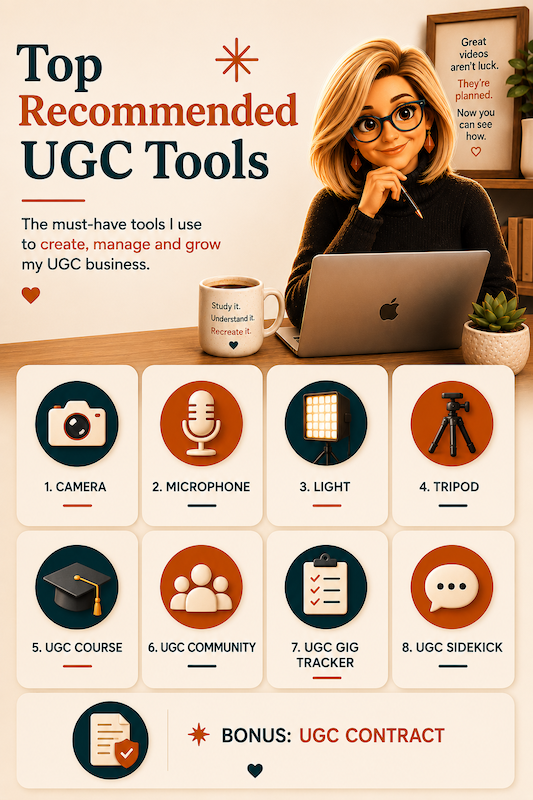
8 Things Worth Paying for as a UGC Creator
Wondering what UGC creators should invest in? Here are eight things worth paying for, including equipment, education, a gig tracker, UGC Sidekick, and a solid contract.

The AI Free Ride Is Ending. I Noticed It in My Token Balance.
What Netflix taught me about what’s coming next, and what I’m doing about it before it gets worse. Notice your AI platform running out of credits or tokens faster than before?

The UGC Visibility Problem No One Is Talking About
Most UGC doesn't fail because it's bad. It fails because no one ever sees it. That's not a creativity problem. It's a visibility problem.